
How Know My Shop works
Keep your till.
Get to know your shop.
Start with the category totals you already use. Add cash movements, purchases and stock counts to build a more useful management picture.
Your categories
Name three to twelve areas of your business.
Your daily totals
Enter the figures from your existing till report.
Your clearer picture
Review cash, gross profit estimates and category performance.
01 / A familiar place to start
Close the day
with the numbers you know.
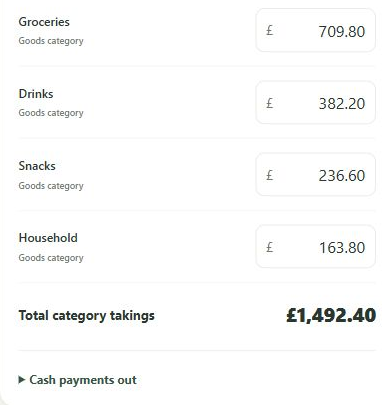
Record each category’s sales total and split the takings into cash and card. Add named cash payments, cash put in and cash banked. Compare the expected cash with what you count.
You enter the totals yourself. Know My Shop works alongside the till or POS you already use.
02 / Follow the categories
Make purchases part
of the same story.
Split a supplier invoice into the same categories you use for sales. This connects what comes into the shop with what goes out through the till.
Set category margin assumptions and sales targets when you are ready. Estimates begin to show the relative contribution of each part of the business.
Read the category guides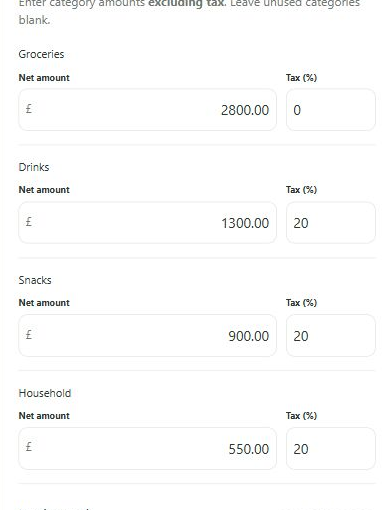
03 / Check, then understand
Test the estimates.
Find better questions.
Stock estimates use your opening values, purchases, sales and category margin assumptions. Dated category counts help you compare the estimate with what is there.
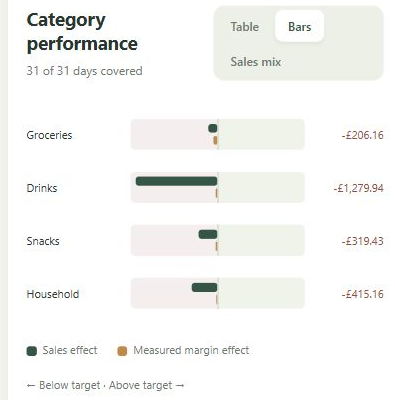
With suitable opening and closing counts and purchase records, the performance report can separate the gross-profit effect of sales from the effect of margin.
A target margin is an assumption, not proof of the margin achieved. The app keeps incomplete information visible rather than filling gaps with false certainty.
A few useful answers
Made to fit
around your shop.
Do I need a new till or an integration?
No. Keep your existing till. You manually enter the category totals from the report you already have. The pilot does not automatically connect to a POS.
Do I have to record every product?
No. Know My Shop works at category level. It estimates stock value; it does not track how many of each individual item are on the shelf.
What do I need to get started?
A shop name, your currency and three to twelve sales categories. Cash and card totals form the daily routine. Margin assumptions, opening stock and purchases can be added as you build the picture.
Can I use it on my phone?
Yes. The private pilot is a web app for phone and computer. Sign in with your authorised email to use your own saved shop records across devices.
Does it replace my accountant or accounting software?
It provides management information. It is not a full statutory profit and loss account, VAT return or tax filing system. Gross profit and recorded expenses need to be understood in that context.
What does it cost?
The product is in a private pilot. Public subscription prices have not been announced. You can register your interest if you would like to ask about trying the private pilot.
The private pilot
Could this be
your clearer picture?
Run a small shop and want to try Know My Shop? Tell us a little about your business. We’ll get in touch about the pilot and whether it could suit you.
This is a request to try the private pilot. It does not create an account or commit you to a purchase.